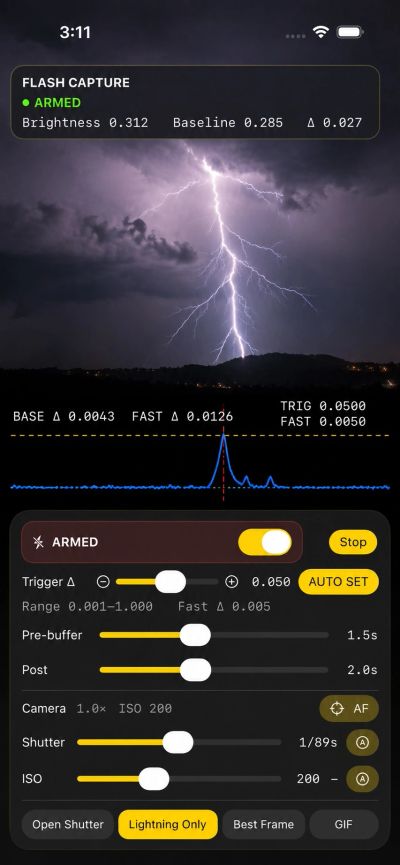
Flash Capture
Capture lightning before you can react.
Flash Capture is a specialised photography app designed to automatically capture sudden flashes of light, with a particular focus on lightning photography.
Instead of relying on reaction time, Flash Capture continuously analyses the camera image using a bespoke real-time detection algorithm. When a qualifying change in brightness is detected, the app captures frames from both before and after the event and automatically creates several photographic results.
More than a camera trigger
Flash Capture combines real-time image analysis, pre-event buffering and computational photography to help capture events that may last only a fraction of a second.
Bespoke flash detection
Flash Capture maintains an adaptive measurement of the scene and looks for rapid changes in brightness. Its two-stage detection process combines fast brightness-change detection with a configurable trigger threshold to help distinguish significant flashes from normal changes in the scene.
Pre-trigger capture
The camera is continuously buffered while monitoring. When an event occurs, Flash Capture can retain images captured before the trigger as well as those captured afterwards.
This means capture does not have to begin after the lightning has already appeared.
AUTO SET
Lighting conditions can vary enormously between daylight, twilight and night photography. AUTO SET measures current scene variation and automatically establishes a starting trigger threshold for the conditions.
Detection regions
A configurable 48-cell detection grid allows selected areas of the scene to be excluded from triggering.
A streetlight, illuminated building, road or other unwanted source can therefore be excluded from detection without cropping it from the photograph.
Multiple results from every event
Flash Capture can automatically create four different photographic products from a captured event.
Animated GIF
Creates an animated replay showing the progression of the event.
Photography controls
Flash Capture provides controls for shutter, ISO, focus and touch-to-focus, together with live camera information and composition guides.
A live detection chart displays the changing scene brightness, rapid-change measurement and trigger thresholds, making it possible to see exactly what the detection system is responding to.
Captured events are retained in Session History and photographic products can be automatically saved to Photos.
Designed for lightning photography
Flash Capture allows the camera to remain watching while you remain in a safer, sheltered location.
The app is a photographic tool only. It does not predict storms, detect approaching lightning or determine whether a location is safe. Always follow official weather warnings and lightning-safety advice.