Horizon Capture
Map your observing horizon with your iPhone.
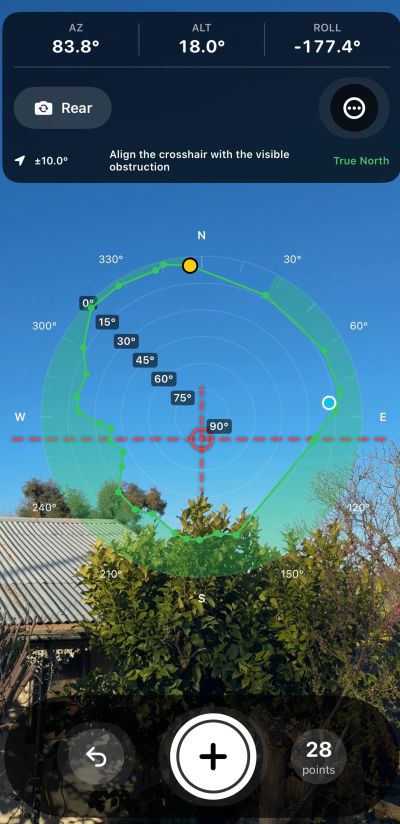
Capture the altitude and azimuth of trees, buildings, hills and other obstructions around your telescope or observatory, then export the completed horizon profile for use in your astronomy workflow.
Turn the visible horizon into useful data
Horizon Capture uses your iPhone’s camera, compass and motion sensors to help you map the limits of your observing site.
Point the phone at the top of an obstruction, align it with the sighting crosshair and capture the point. Continue around the horizon, and the app builds a live polar profile showing the altitude of obstructions at each azimuth.
Built for telescope users
- Camera sighting
Align the crosshair directly with trees, buildings, ridges and other obstructions. - Altitude + azimuth
Capture each horizon point as a simple Alt/Az coordinate. - Live polar map
Watch your observing horizon form while you work. - Start-point reference
The first measurement remains clearly marked so you always know where the survey began. - Live position indicator
See the phone’s current pointing direction directly on the polar plot. - True-north support
Uses true heading where it is available from the device. - Front or rear camera
Choose whichever camera makes sighting easier. - Simple export
Save your results as .hrz or plain-text coordinate data.
How it works:
1. Choose your starting point
Stand at or near the telescope’s observing position and choose a convenient place on the horizon to begin.
2. Sight the obstruction
Point the phone toward the highest obstruction at that azimuth and align it with the crosshair.
3. Capture the point
Record the altitude and azimuth. The point immediately appears on the polar horizon display.
4. Continue around the horizon
Move around the full 360° horizon, capturing enough points to represent the surrounding terrain and structures.
5. Export
Export your finished profile for use in your astronomy planning or automation software.
Understanding measurement accuracy
Horizon Capture uses the orientation and heading sensors built into your iPhone. Measurement quality therefore depends on the device, sensor calibration and the local environment.
Nearby metal structures, vehicles, telescope mounts, reinforced concrete, electrical equipment and other sources of magnetic interference may affect compass readings.
For best results:
- keep the phone away from large metal objects while measuring;
- allow the device heading to stabilise;
- pay attention to the heading-accuracy indicator;
- repeat questionable measurements; and
- verify critical horizon profiles before relying on them for automated telescope operation.
Horizon Capture is intended as an astronomy planning and configuration aid, not as a professional surveying instrument.